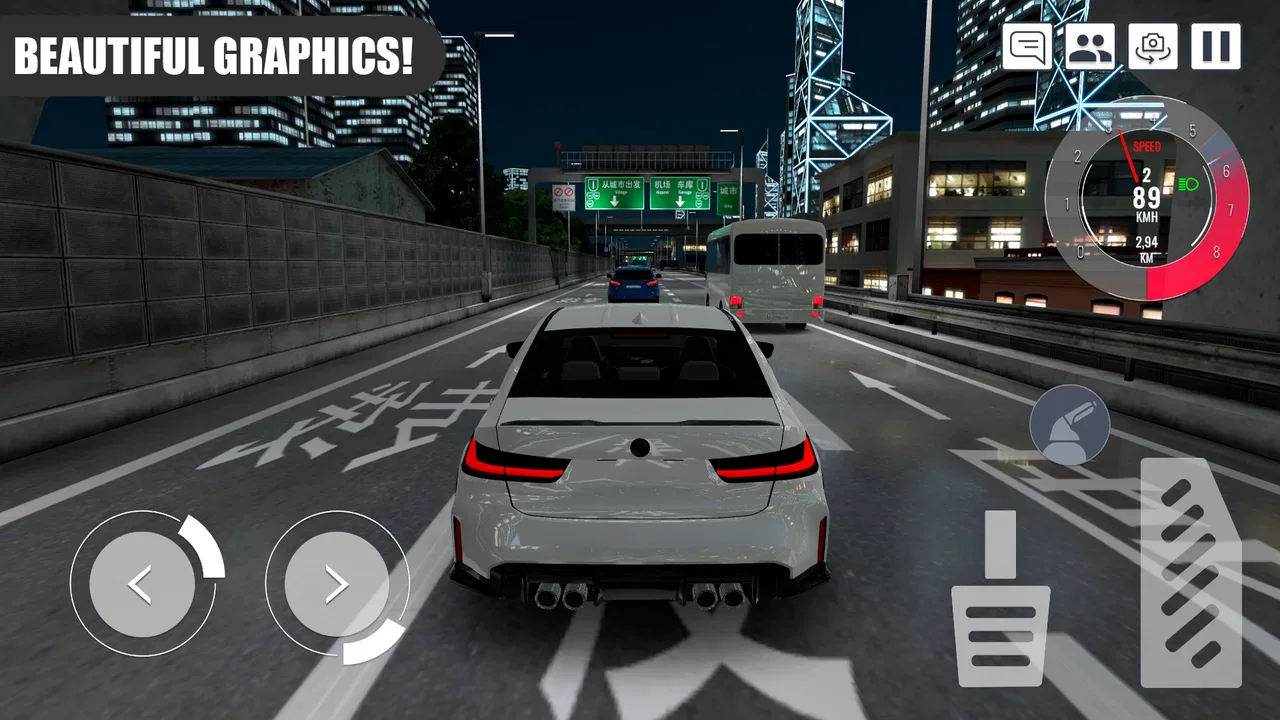
Custom Club: Online Racing 3D
- 4.6
- Rating
- 10.00M
- Installs
- Free
- Price

 Analysis by App-foxy
I approached Custom Club: Online Racing 3D as a game for players who want more control over their cars than a quick arcade racer usually provides. It is a free racing game from GamesEZ, built around realistic driving and vehicle customization rather than a single burst of speed. That difference becomes clear almost immediately: the enjoyable part is not only reaching the finish line, but also finding a setup and driving routine that feels comfortable in your hands.
The game has attracted a large audience, with more than ten million installs and an average score of 4.6 from roughly twenty-three thousand ratings. Those figures suggest that its central idea works for many players, but they do not tell you whether its driving style suits you. In my experience, the important question is whether you enjoy adjusting a car, learning how it responds, and repeating a route to improve. If you only want instant, exaggerated action, this may feel more deliberate than expected.
How I built a reliable driving routine
My first useful habit was to stop treating every race as a test of maximum speed. In a game with a realistic driving focus, a clean line and controlled braking are often more valuable than entering every corner aggressively. I found it easier to learn the car by making small changes between runs instead of changing several things at once. That way, I could tell whether a different setup actually helped or whether I had simply become more familiar with the route.
You May Also Like

 AccuWeather: Weather Radar
AccuWeather Review: A Quick, Clear Forecast for Everyday Decisions
For everyday plans, the best forecast is the one you can understand quickly. AccuWeather makes rain timing, radar, and local conditions easy to act on, with a few trade-offs.

 Hill Climb Racing
Why Hill Climb Racing Still Turns Crashes Into One More Run
A tiny car, a bumpy hill and one more upgrade: Hill Climb Racing keeps resurfacing because its simple chaos makes every near-miss feel personal.

 AliExpress - Shopping App
AliExpress Makes Global Shopping Feel Personal, but Shoppers Bear the Risk
AliExpress turns a global marketplace into a pocket-sized discovery engine. Its reach is useful, its shopping loop compelling, and its trade-offs easy to miss.

 Lords Mobile: Kingdom Wars
Lords Mobile Is a Kingdom-Building Routine, Not a Quick Match
A case-by-case verdict on the building, battles, device demands, and social commitments that make Lords Mobile rewarding for some players and exhausting for others.

 PDF Scanner app - TapScanner
TapScanner Makes Paperwork Easier to Capture, Check, and Share
TapScanner makes scanning with a phone feel less like a rescue operation and more like a dependable step in getting work done. Its capture tools are useful, though not flawless.

 Block Blast!
 Shows How Much a Puzzle Game Can Leave Out
A quiet grid game shows why puzzle players increasingly value instant clarity, repeatable skill and low-pressure play—and where the genre still needs to catch up.
More From Our News Desk
View All News


A practical baseline workflow is simple. I begin by choosing one car, checking the available customization, and driving without trying to perfect the result immediately. The first run is mainly for noticing where the car feels unstable, where braking arrives too late, and which corners punish excessive throttle. On the next attempt, I focus on one problem only. This makes progress easier to judge and avoids the common mistake of rebuilding the entire car after every disappointing turn.
This approach also makes the game more approachable for casual players. You do not need to understand every adjustment before enjoying a race. Start with the default feel, learn the controls, and only then begin experimenting. The customization system has more value when it answers a driving problem you have actually noticed. Changing parts or settings without knowing what you want to improve can make the car feel different without making it better.
For an everyday scenario, I can see myself playing this in short sessions after work. I would run the same course a few times, use the first attempt to warm up, and spend the next two attempts correcting one corner or one braking point. That is more satisfying than rushing through several races without learning anything. It also suits players who enjoy gradual improvement but do not have time for a long uninterrupted session.
The controls deserve attention before customization does. Whatever control method feels natural to you should be tested on a relatively quiet section of driving rather than during a difficult race. I prefer a setup that lets me make small steering corrections without fighting the screen. If the car constantly overreacts to a light touch, the problem may be the control arrangement or sensitivity rather than the vehicle itself.
I also recommend keeping your inputs smooth. Rapid steering corrections can turn a manageable corner into a sequence of overcorrections, especially when the car is already unsettled. A useful rhythm is to brake in a straight line, turn once with purpose, and begin accelerating only when the car is pointing toward the exit. It is not glamorous, but it produces more repeatable results than treating every bend like an emergency.
Settings that are worth checking before you tune a car
Before spending time on the car, I would inspect the available control and display options. A racing game can feel harder than it really is when the interface is uncomfortable. Look for the arrangement that keeps steering, braking, and acceleration easy to reach without covering the part of the screen where you need to see the road. The best layout is personal, but the test should be practical: can you make a small correction while still reading the next corner?
It is also worth checking whether the game lets you adjust sensitivity or related control behavior. I would begin conservatively, because an overly sensitive setting can make a car appear nervous and difficult even when its handling is fine. After a few runs, change only one control option and compare the result on the same section. This is a faster way to find comfort than repeatedly switching settings without a consistent test.
Visual options matter for a different reason. A detailed racing environment is enjoyable, but a stable view is more useful than a dramatic one if the image becomes distracting or difficult to read. I tend to favor the camera that makes corner entry and road position easiest to judge. If a closer view makes speed feel exciting but hides the exit, it may be better for casual driving than for learning a difficult course.
Sound can help with concentration, too. I prefer a level where engine feedback is noticeable but not overwhelming. When the audio is too loud, it becomes harder to focus on the visual rhythm of braking and turning. When it is too quiet, the car can feel disconnected. This is a small adjustment, yet it can make repeated practice less tiring.
Players using older hardware should approach visual settings with the same practical mindset. The game supports Android devices running version 8.0 or later, but compatibility does not guarantee that every device will deliver the same experience. If driving feels inconsistent, reducing visual demands where possible may be more useful than chasing the highest appearance quality. In a racing game, steady control response matters more than decorative detail.
One setting-related habit I found valuable is taking a short test drive after any meaningful change. Do not judge a new control layout while also learning a new car and route. Keep two things stable and change one variable. This sounds obvious, but it prevents a great deal of wasted time. Experienced players often look fast because they remove uncertainty from their testing rather than because they make dramatic adjustments.
Faster patterns that improve consistency
The quickest improvement usually comes from repeating a small section mentally, not from driving every race at full intensity. I try to divide a route into three phases: braking, turning, and exit. If I lose time, I ask which phase caused it. Braking too late may create a slow exit; turning too sharply may force a correction; accelerating too early may push the car wide. This simple diagnosis gives customization a clear purpose.
Another useful pattern is to choose a reference point before each corner. It might be a visible change in the roadside, a sign, or another fixed feature. The point is not to memorize a perfect number, but to create a repeatable cue. If the car reaches the corner too quickly, brake earlier on the next attempt. If you are consistently slow, move the cue gradually. This method is more reliable than reacting to the corner at the last moment.
I would also avoid changing cars too often while learning. A new vehicle can be enjoyable, but it makes it difficult to know whether improvement came from your driving or from different handling. Keeping one car for a focused practice block gives you a clearer sense of its strengths and weaknesses. After that, switching vehicles becomes a comparison rather than a reset.
Customization is most effective when treated as a series of compromises. A change that helps acceleration may not make the car easier to control. A setup that feels stable may sacrifice some excitement. I would prioritize the adjustment that solves the problem appearing most often in your runs. If you regularly miss corners because the car feels unpredictable, stability is more valuable than a small gain in straight-line speed.
This is where the game separates itself from simpler racing alternatives. Many arcade racers reward constant acceleration, generous recovery, and spectacular shortcuts. Custom Club: Online Racing 3D asks for more attention to the relationship between the car and the road. That can feel slower at first, but it gives each improvement more meaning. On the other hand, an arcade racer remains the better choice if you want immediate action, forgiving collisions, or progress that does not depend on careful repetition.
There is also a good reason to play with a repeatable session plan. I would use one run to learn, one to test a change, and one to confirm whether the change worked. If the third run is worse, I would return to the previous setup rather than continuing to stack adjustments. Keeping track mentally of what changed is enough for small experiments, and it prevents the familiar problem of forgetting which setting produced a comfortable result.
For players who enjoy online competition, consistency becomes even more important than a single impressive run. A risky approach may produce a fast result once, while a controlled approach is more likely to survive a full race. I would rather arrive at the final section with a stable car than gain a little time early and spend the rest of the race recovering from mistakes. That mindset makes the game feel less like a reflex contest and more like a test of preparation.
Where the realistic approach reaches its limits
The same realism that gives the game character can create friction. New players may expect customization to make them faster immediately, but a different setup cannot replace familiarity with the controls. Some changes may even feel worse until you adapt to them. That is why I would not judge a vehicle after one short attempt. Give yourself enough time to separate unfamiliarity from a genuine weakness.
The game may also be a poor fit for someone who dislikes repetition. Learning a route, comparing adjustments, and refining corner entry all require patience. If you prefer a large variety of instantly different activities, the focused driving loop could become routine. In that case, a broader arcade racer or a game built around rapid unlocks may provide more immediate variety.
Another limitation is the presence of in-app purchases, which range from $0.99 to $15.99 per item. The game is free to start, but players who are sensitive to optional spending should decide in advance whether they want to keep their experience entirely within the free portion. I would recommend treating purchases as a personal boundary rather than allowing repeated small decisions to shape the session. The most useful early progress still comes from learning the car and controls.
The Everyone content rating makes it suitable for a broad audience, but that does not mean every player will enjoy its demands. Younger or very casual players may need time to become comfortable with steering and braking. Adults looking for a serious simulator may also want to keep expectations measured: this is a mobile racing game, not a replacement for a dedicated driving simulation with specialized hardware and deep technical telemetry.
Performance and comfort should guide your device expectations as well. The minimum Android requirement is version 8.0, and the current version is 5.0.1, but the feel of a racing game depends heavily on how consistently your device responds during play. If the screen is crowded, the controls are hard to reach, or the game does not feel smooth, do not immediately blame your driving. Adjust the presentation and control setup first, then decide whether the device is the limiting factor.
Compared with a conventional console-style racer, the strengths here are convenience, customization, and the ability to practice in short bursts. The trade-off is that touch controls require more personal adjustment, and the screen offers less physical feedback than a controller or wheel. Compared with a simple mobile arcade racer, this game offers more room for deliberate improvement but less instant forgiveness. Those differences should shape your choice more than the rating alone.
Who will get the most from it
I would recommend this game to someone who likes cars but does not want a purely decorative collection experience. It is especially appealing if you enjoy asking why a run went wrong and then testing a practical correction. Players who like tuning, controlled driving, and gradual mastery will find more depth here than the short description suggests.
It also works well for people who want flexible sessions. You can use a few minutes to practice a familiar section, or spend longer comparing cars and adjustments. The free entry point makes it easy to try without committing immediately, while the large player base indicates that finding a community of interested racers should not be difficult in principle.
I would be more cautious about recommending it to players who want a story-led campaign, broad non-racing activities, or constant novelty. It is centered on driving and customization, so its appeal depends on whether that loop remains enjoyable after the first excitement fades. Likewise, players who dislike optional purchases should review their own spending habits before settling into the game.
One final practical tip is to protect your best setup from impulsive experimentation. Once a car feels reliable, treat it as your baseline and make changes only after a test run has shown a specific weakness. This habit is more valuable than chasing every possible adjustment. It gives you a dependable option to return to when a new configuration makes the car harder to control.
After spending time with it, I see Custom Club: Online Racing 3D as a thoughtful mobile racer rather than a disposable speed game. GamesEZ has built its identity around the connection between driving and customization, and that connection is strongest when I slow down enough to learn what the car is doing. The experience rewards a calm workflow: set up the controls, practice one problem, change one thing, and confirm the result.
My recommendation is straightforward: try it if you want a free racing game where improvement comes from repeatable habits and personal setup choices. Keep your expectations realistic about touch controls, optional purchases, and the patience required to learn. If you prefer instant arcade action, another racing game may suit you better. If you enjoy turning a difficult corner into a reliable one, this is a worthwhile game to keep installed.
FAQs for Custom Club: Online Racing 3D
01What are the system requirements for Custom Club: Online Racing 3D?
Custom Club: Online Racing 3D requires Android 8.0 or later, or iOS 12.0 or later. It also needs at least 2GB of RAM and 500MB of free storage space to ensure smooth gameplay. A stable internet connection is necessary for online features and multiplayer modes.
02Is Custom Club: Online Racing 3D free to play?
Yes, Custom Club: Online Racing 3D is free to download and play. However, it includes in-app purchases for players who wish to enhance their experience with additional cars, customizations, or premium features. These purchases are optional and not required to enjoy the game.
03How customizable are the cars in Custom Club: Online Racing 3D?
The game offers extensive customization options, allowing players to modify body kits, paint jobs, decals, and more. You can upgrade parts to improve performance, ensuring your car reflects your style and meets racing needs. The customization depth makes each vehicle unique in appearance and capability.
04Can I play Custom Club: Online Racing 3D offline?
While Custom Club: Online Racing 3D primarily focuses on online multiplayer racing, it does offer offline modes for practice and single-player racing. However, to enjoy the full range of features, including competitive multiplayer, a stable internet connection is recommended.
05What types of races and challenges are available in the game?
The game features a variety of races, including standard races, time trials, and elimination rounds. There are also special events and challenges that offer unique rewards. Players can compete in weekly tournaments and leaderboards to test their skills against others globally.
Pros
- Realistic car physics enhance gameplay.
- Extensive car customization options available.
- Diverse track selection keeps it engaging.
- Multiplayer mode for competitive racing.
- Regular updates with new features and cars.
Cons
- In-app purchases can be costly.
- Occasional lag in multiplayer mode.
- Requires constant internet connection.
- Ad frequency can disrupt gameplay.
- High battery consumption on some devices.

Custom Club: Online Racing 3D
Gallery